
USFans Coupon: Check Whether One Offer Actually Reduces Your Cost
Before using a USFans coupon, write down the purchase you would make without it. Keep the same items, quantities and intended service in view. That baseline lets you distinguish a real reduction from a larger purchase encouraged by a headline discount.
This page walks through evaluating one offer. For the wider distinction between product, shipping and invitation benefits, use the coupon-codes guide. Check the offer's current eligibility and the resulting payable amount before including a reduction in your budget.
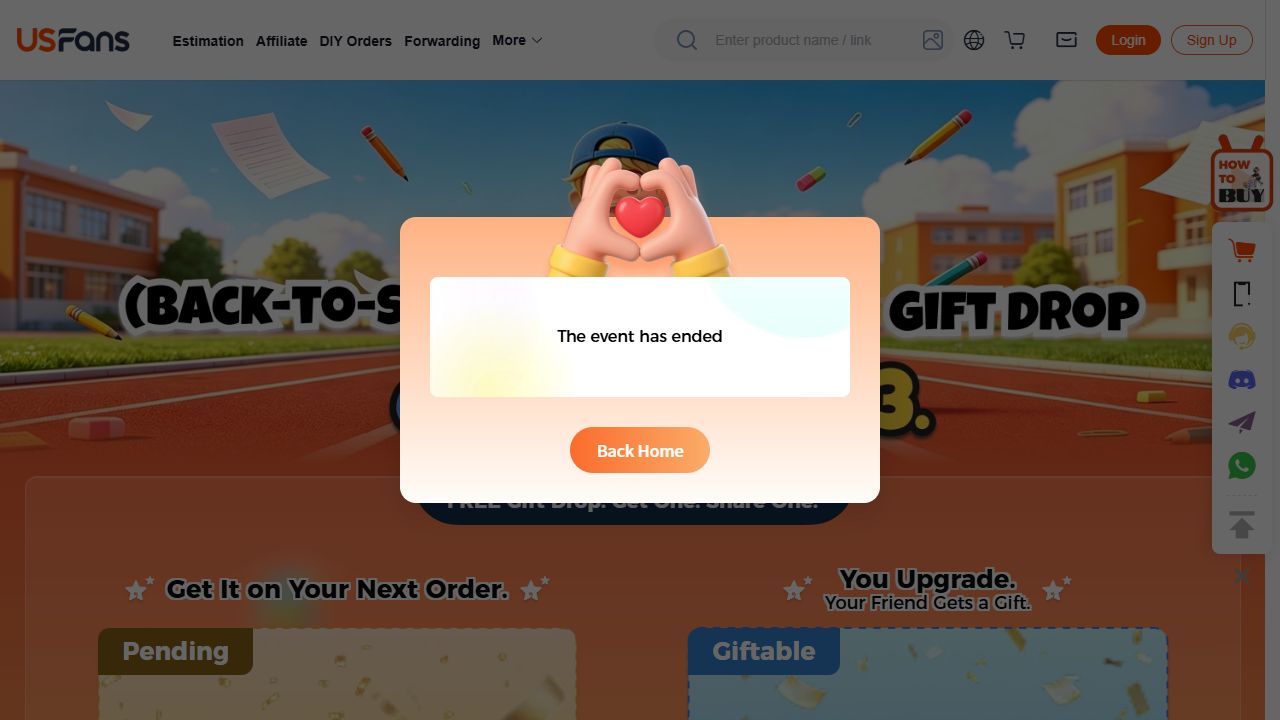
An ended promotion still visible on 1 October 2026
A dated example helps distinguish an offer page from a usable benefit: the USFans Back-to-School page was marked ended on 1 October 2026. A gift banner still loading does not reduce the baseline cost of your planned purchase. Evaluate any different offer against its own terms.
Identify what the offer changes
Read the stated qualifying action and benefit together. Does the offer reduce an eligible charge now, or promise a later reward? Is it tied to a product order or to international shipping? A benefit at another stage cannot be subtracted from the amount currently due unless it actually applies there.
Record any minimum qualifying spend, account requirement, expiry and exclusions. If the description is incomplete, clarify it before treating the advertised amount as part of your budget. A screenshot from another buyer does not establish your account's eligibility.
Calculate the difference from your original plan
Consider a hypothetical example in a single currency. Your intended basket costs 80. An offer requires qualifying spending of 100 and reduces that amount by 10. If you add an unnecessary item costing 20 solely to qualify, the resulting amount is 90, assuming no other charges change.
That is a reduction from the enlarged basket of 100, but it is still 10 more than your original plan of 80. If you wanted the extra item anyway, the comparison is different. The point is to compare with your actual purchasing intention, not only with the amount shown immediately before applying the discount. These figures are an arithmetic illustration, not USFans offer terms.
Use the same reasoning for a shipping-related benefit: establish which charge is eligible, then check the complete payable amount. Do not count a possible future reward as money already deducted.
Confirm the result without changing unrelated inputs
Keep the original basket or parcel unchanged while evaluating an eligible offer. Compare the before-and-after breakdown, including any service choices you made. If you also change quantities or packaging, record that separately; the whole price difference cannot then be attributed to the coupon.
| Observation | What it establishes |
|---|---|
| A code appears in an entry field | The text was entered, not necessarily accepted. |
| A message says a benefit applies | A response was displayed; still inspect the amount and scope. |
| The payable total decreases with unchanged inputs | A displayed reduction for that particular calculation. |
| Another account receives a benefit | That account's reported result, not universal eligibility. |
| A future credit is mentioned | A possible later benefit subject to its conditions, not today's cash reduction. |
Do not complete a purchase merely to test a code. Review the applicable conditions and displayed totals before taking an irreversible step.
Keep the product decision intact
If you are considering an extra T-shirt to meet a threshold, check whether it belongs in your shortlist independently of the offer. Compare its selected size, colour and measurements rather than treating an inexpensive addition as automatically worthwhile.
Inspect the T-shirt candidate on OG
This reference does not establish that any coupon applies to that item. Save the product through your spreadsheet links, and keep the offer calculation separate from the garment's suitability.
When the response is not what you expected
Preserve the actual message, the offer conditions and the unchanged purchase inputs. Check the stage and qualifying amount first. Do not label every failed attempt as an expired code or keep making payments in the hope that a discount will appear afterwards.
For an unexplained difference, ask support one precise question: which stated condition was not met, or which part of the charge was excluded? Keep account and payment identifiers private. The payment-failure guide covers a separate problem—uncertainty about a transaction already attempted.
Check what happens if the purchase changes later
A cancellation, partial return or revised parcel may affect an offer differently from the underlying payment. Check the terms rather than assuming that a refunded amount restores a used coupon or preserves a future reward.
Use the ordering guide to keep the stages distinct and the shipping guide when the offer concerns a parcel. The main spreadsheet should remain a product-discovery tool, not a reason to purchase items you did not need.
Common questions
Is the largest headline discount always the best result?
No. Compare the actual amount you would spend for the purchase you want, including any changes required to qualify.
Can I treat a referral reward as an immediate coupon?
Only if the actual terms and checkout result establish that effect. A later or differently scoped benefit is not the same reduction.
Does a successful attempt prove the code works for every buyer?
No. The result is tied to the account, inputs, conditions and time of that attempt.