
USFans Coupon Codes: Check the Stage Before Trying the Offer
A USFans coupon code is useful only if its conditions match the purchase you are making. Before trying a code, identify what it is supposed to reduce: a product order, a shipping payment or another specified charge. An invitation benefit and a checkout discount are not automatically the same thing.
Keep the offer's wording and date with the code. A copied string without its eligibility conditions can leave you testing the wrong benefit at the wrong stage.
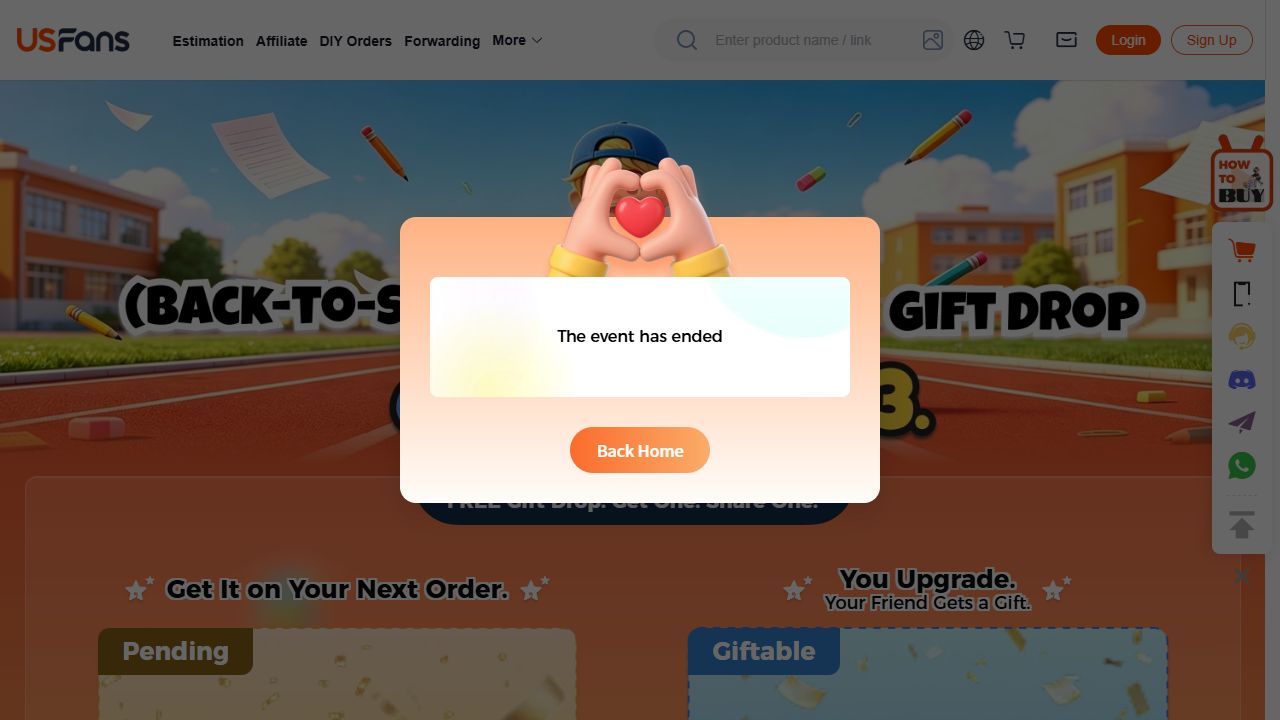
An ended promotion still visible on 1 October 2026
A promotion can remain easy to find after it closes. On 1 October 2026, USFans' Back-to-School page displayed an ended-event notice over its gift artwork. Check the event status before testing a saved code; the banner alone does not establish an offer for the payment stage you are using.
Start with the offer's conditions
Check the source and whether the offer is still presented as active. Read any account eligibility, minimum spend, item, route, destination and expiry requirements. Do not treat a dated community post or a screenshot of another account's result as confirmation that your account qualifies.
If the offer is attached to an invitation, establish what action is required and what benefit it actually describes. A reward for an inviter, a balance credit or a shipping voucher should not be relabelled as an immediate reduction on every product.
The spreadsheet guide separates purchase stages so a product-order offer is not confused with international parcel payment.
Match the code to the amount being charged
For a USFans shipping coupon, check the selected parcel and the applicable service conditions. A reduction described as shipping-related does not establish a reduction in the merchandise price or every additional charge.
For an order coupon, identify the qualifying product amount and the selected items. Keep optional services or other charges separate where they are shown. The shipping guide explains why a product purchase and a parcel charge need different comparisons.
Do not change the item description or account information to make an ineligible offer appear eligible. Instead, determine whether the legitimate purchase meets the terms.
Compare the same basket before and after
Record the relevant subtotal and the payable total before applying the offer, then compare the result with the same items, quantities and services. If the basket changes at the same time, you cannot attribute the entire difference to the code.
As an arithmetic illustration, a displayed reduction of 10 on a total of 100 would leave 90 only if nothing else changed. If an additional charge of 5 is then added, the amount due would be 95. These numbers illustrate how to read a breakdown; they are not a live USFans promotion.
Look for the actual applied reduction and remaining amount due. A code appearing in a field is not proof that it was accepted, and a celebratory message is not a substitute for checking the payment summary.
If the code is rejected, use the message to narrow the question
Check spelling and accidental spaces, then return to the conditions. Is the code being used at the stated stage? Does the account meet the eligibility rule? Is the qualifying amount correct? Has the offer expired or already been used under its terms?
These are questions to investigate, not claims about the exact messages the current app will display. Preserve the actual message rather than translating every failure into “expired.” A code can fail for a different reason.
Avoid creating repeated payments or changing unrelated account details just to see whether the result changes. If the conditions appear to match but the offer still fails, contact support with the offer details, relevant transaction stage and full response, keeping private identifiers out of public posts.
Treat a long claim link as a link, not a magic code
Search results sometimes include long activity-claim addresses or fragments with security-looking words. Their wording does not establish that they are valid, active or appropriate for your account. Do not guess missing parameters or repeatedly alter a protected link to force a result.
Use the offer access available through the platform context you recognise, and verify unexpected login or payment requests before acting. The safety guide explains why a familiar name in a message does not establish the destination's identity.
Decide whether the purchase still makes sense
A discount should not obscure the selected product and its unresolved details. Check the variation, size and contents you actually want before adding items simply to reach a spending threshold. Compare the extra spending with the confirmed benefit, not the headline percentage alone.
Inspect this jacket's details on OG before adding another item
Keep the candidate separate from the coupon's conditions. A product listing does not establish that a particular promotion applies to its order. Your USFans spreadsheet can retain the intended item while the offer is evaluated independently.
Coupon questions
Does an invitation code guarantee a checkout discount?
No. Read the benefit and qualifying action described by that specific offer. Do not substitute another campaign's reward or assume the inviter and invited buyer receive the same benefit.
Can I combine several coupons?
Check the current offer terms and the actual checkout result. Do not assume stacking is available because separate codes exist. Compare the final payable amount and retain any conditions that affect later cancellation or reuse.
Will cancelling an order restore the coupon?
Do not assume automatic restoration. Check the applicable offer and cancellation terms, then confirm the resulting account state. Refund of a payment and restoration of a promotional benefit are separate questions.
What should I keep if a valid-looking offer fails?
Keep the code, source, stated conditions, date, relevant basket or parcel and the exact response privately. That record supports a specific enquiry without claiming that an untested offer works for everyone.