
USFans Spreadsheet Links: Save a Find You Can Identify Again
USFans spreadsheet links are useful only if they take you back to the product you meant to compare. A destination can open successfully while selecting a different colour, showing a different quantity or leaving you on a search page. Check those details before treating a saved link as ready for an order.
Keep two things together: the address that led you to the candidate and a short description of the option you intended. The address helps you return; the description helps you notice when the page no longer represents the same decision.
Identify the kind of page that opened
Not every shopping destination is a product record. A category gathers candidates, a search page responds to a query and a product page describes a particular listing. An account screen may not identify a product at all.
| Destination | What it helps you do | What still needs checking |
|---|---|---|
| Category page | Explore a type of item | Choose and inspect a specific listing |
| Search results | Compare candidates for a query | Open the intended product rather than save its position |
| Product page | Examine one listing | Confirm the option, quantity and current details |
| Login or account page | Access an account function | Verify the destination before entering credentials |
The distinction matters when a friend shares a find. “Third item on the page” may stop identifying the same candidate if the results change. Ask for the product destination and the relevant option, not just the position in a list.
Preserve the address before modifying it
Copy the complete product address for your private notes. Do not delete unfamiliar parts of it merely to make it look shorter: some parameters can affect the destination or selection. Compare the address shown after the page opens with what you expected.
Before sharing an address publicly, check that it is a public product destination rather than an account, checkout or order record. Do not share links containing private access information. A shorter-looking link is not automatically safer, and a longer-looking one is not automatically suspicious; inspect what it actually opens.
If the destination is unfamiliar and requests credentials, return through the account entry point you normally use. The USFans spreadsheet safety guide separates this account check from ordinary product browsing.
Confirm the option after the product loads
The product can be right while the option is wrong. Compare colour, size, quantity and the included pieces with your notes. Do not assume the hero image describes the currently selected variation.
For example, a jacket page might show several colours in its gallery. Saving the page while viewing a dark version does not prove that the same version will be selected on a later visit. Record which option you inspected and reselect it when necessary before comparing its measurements or price.
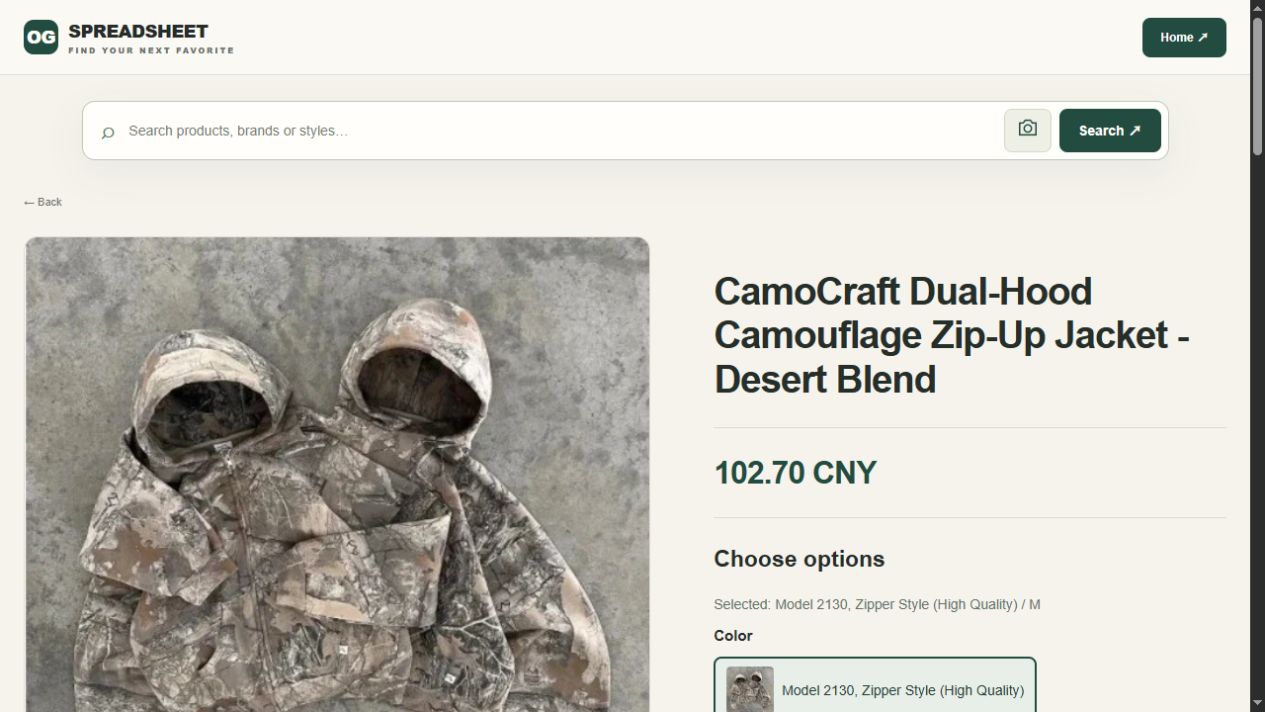
Open the jacket candidate on OG
This is a concrete product destination for inspection. It is not a claim that a particular size is available or that any downstream purchase has been tested. Use the jacket guide to decide which garment details matter once you have identified the listing.
Do not mistake conversion for product verification
If you use a link-conversion or import feature, inspect the result as a new destination. A successful-looking response does not establish that every option, price or seller detail was carried across. A generic search result is not proof that a particular product was imported.
Keep the original and resulting addresses in your private comparison notes. Check the product identity first, then the selected option. If the result is another item, do not transfer the original measurements or photographs to it as though nothing changed.
If the import leaves the product unidentified, retain the original address and check the response before trying another destination. A button labelled as a converter is less useful than a result that you can actually match to the intended listing and option.
When a link breaks, preserve the difference
A failed destination can reflect several things, including an unavailable page or a temporary loading problem. Do not decide the cause from a blank screen alone. Try returning through a known page and compare the destination carefully, without repeatedly submitting an order or payment.
If you find a visually similar replacement, create a separate candidate. Recheck its size information, option and cost. The old observation remains about the old product until you establish otherwise.
To rebuild the shortlist, search OG by product name or style. Open a candidate from the response and compare its identifying details with the saved note. Treat any missing image preview or failed request as an unfinished search, not as evidence that the initial catalogue matches your reference.
The archive guide helps retain older finds without treating them as currently available. For a warning encountered while acting on a page, use the warning-message guide rather than trying to hide the message.
Keep the useful notes small
A reusable entry need not be complicated. Include the product address, intended variant, one distinguishing feature and the date you inspected it. Add the unresolved question that matters most, such as garment length or what is included in a set.
Do not include another buyer's account name, order number or delivery label to make a recommendation look more convincing. A public product link and a clear description can identify a candidate without exposing a person's transaction.
When you later receive order-specific pictures, keep them connected to the correct purchase rather than mixing them into a general collection. The QC guide explains why a listing photo and a warehouse photo answer different questions.
Use the link as the start of the decision
Once the destination and option are clear, compare suitability and total cost. A valid link does not establish fit, authenticity, shipping eligibility or a successful future order. Follow the USFans spreadsheet guide for the stages that come after selection.
Return to the USFans spreadsheet to organise candidates, or use the best spreadsheet comparison if you are still choosing which collection deserves your attention. The spreadsheet review keeps the collection's convenience separate from the eventual purchase outcome.
Can two different links lead to the same product?
Yes, so compare the destination and option before counting them as different candidates. Different addresses alone do not establish different products.
Can one link represent several options?
A product page can offer variations. Save your intended selection in words and confirm it again when you return.
Should I replace a broken link in an old recommendation?
Only after checking the new candidate. Do not retain claims about the old item when the replacement has not been evaluated against them.