
USFans Tracking: Match the Number Before Interpreting the Status
To track a USFans parcel, begin with the shipment recorded in your account—not a number copied from someone else's delivery screenshot. Establish which items belong to that parcel, which transport stage it concerns and which carrier is associated with the number. Only then does the status become useful.
A product order reference and a carrier tracking number serve different purposes. Keep both privately if needed, but do not assume that entering an order reference into a package tracker will show the international shipment.
Connect the saved item to the correct parcel
The item you saved in a USFans spreadsheet may pass through a product order and a domestic shipment before becoming part of an international parcel. If several products are combined, the parcel record concerns the combination, not just the first product you ordered.
Start from your account's relevant order or parcel details. Check the number, the associated service and the items included. If more than one identifier appears, retain its label rather than guessing which one belongs to a particular carrier. Ask support to clarify the relationship if it is not shown.
The USFans tracking instructions checked on 30 September 2026 name Tracking Details on the selected parcel as the entry to its logistics information. Select the parcel first: opening that control on a different shipment would answer a different question. Keep the displayed parcel and carrier identifiers out of public screenshots.
This matters especially when comparing the seller's domestic progress with international tracking. An item reaching the warehouse does not establish that your international parcel has departed. The warehouse guide explains the decisions between those stages.
Read each event with its timestamp and source
Preserve the exact event wording alongside the date, time, location and carrier context shown. Note when you checked it, too: the time you viewed a page is different from the time of the transport event.
If the account page and carrier page seem inconsistent, compare their timestamps and identifiers before deciding that one describes a new problem. Where time zones are stated, account for them. Where they are absent, do not invent an exact sequence from the displayed hours alone.
A compact private record is enough:
| Record | Why it matters |
|---|---|
| Identifier and its label | Distinguishes the order, parcel and carrier reference |
| Associated service | Keeps the event attached to the correct transport context |
| Event wording and event time | Separates what is reported from your interpretation |
| Location, when shown | Preserves the detail needed for a specific enquiry |
| Time checked | Helps compare differently refreshed pages |
Label creation is not the same as carrier possession
For example, USPS explains its label-created/awaiting-item status as a label having been generated before the package has been handed to USPS. That explanation applies to the USPS status if USPS is actually involved in your shipment; it is not proof that every USFans parcel uses USPS or that the parcel has not moved with another transport partner.
Use the carrier's own explanation for the event in front of you. Do not translate every unfamiliar status into “on the plane,” “in customs” or “almost here.” These are different claims and need their own supporting events.
When the tracking number produces no result
First recheck the copied number for missing characters or spaces and verify that you are using the carrier associated with it. Do not alter digits until a result appears: you could end up reading a different shipment.
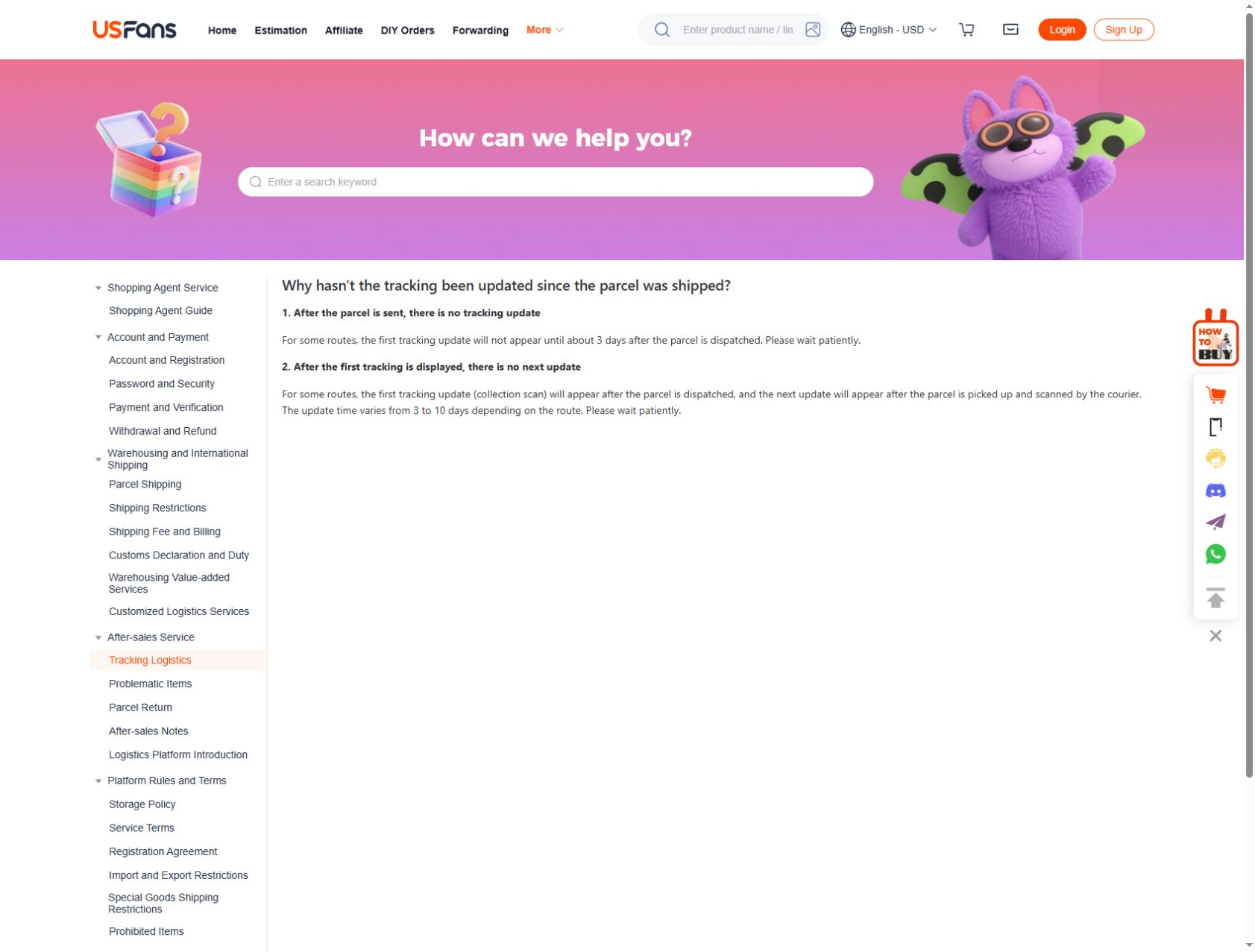
Next, compare the dispatch record with the selected route's guidance. USFans' update explanation checked on 30 September 2026 says that some routes may first show tracking about three days after dispatch. For some routes it describes a later update gap of three to ten days. These are two update situations, not a delivery estimate and not proof that an unrecognised number belongs to your parcel.
If the service's stated process does not resolve the issue, contact support with the parcel reference, tracking number, service name and the time you checked. The support guide helps organise that enquiry. Avoid posting these identifiers publicly.
When a familiar number stops updating
Read the last event in full. Ask whether the next expected information belongs to the same carrier or a later handover, without assuming a handover has occurred. A quiet page alone does not locate the parcel or establish loss.
Check the service's enquiry and claim procedures and preserve any applicable deadlines. The delivery-time guide separates delivery estimates from the stages that precede them; a transport estimate should not be counted from the day you first saved the product.
If a later message asks you to pay, change an address or log in, verify it through your established account or carrier channel. Being genuinely due a parcel does not make every delivery message genuine.
Delivered, collection and missing-item questions
For a delivered event, inspect the recorded delivery details and follow the carrier's instructions if you cannot locate the parcel. For a collection event, check the actual location and requirements rather than assuming home delivery is still pending.
If the parcel arrives but an item appears missing or differs from the selected option, keep that separate from the tracking question. Match the contents against the parcel's item record and preserve the relevant packaging and photographs for the support process. The returns guide addresses the next purchase-related question; a delivered scan alone does not resolve item condition or completeness.
Keep browsing separate from an existing delivery enquiry
When saving a new candidate, retain its own product link and variation so it will not be confused with an item already in transit. A listing helps identify what you want; it cannot show where an earlier parcel is.
Inspect the jacket listing on OG
The spreadsheet links guide explains how to preserve that selection without mixing it with private parcel details.
Tracking questions
Can a package tracker show a parcel without a tracking number?
An account may show order progress before a carrier number is available, but that is not the same as independent carrier tracking. Check the account record or ask support; do not substitute another person's number.
Why do two pages show different events?
They may be showing different identifiers, transport stages or update times. Compare those details first. If the conflict remains, send the two records through a private support channel rather than choosing whichever status sounds more reassuring.
Can I share a tracking screenshot to ask for help?
Remove tracking numbers, barcodes, names, addresses, account identifiers and any other personal details first. Keep only the minimum event wording and timing needed to describe the question. A public screenshot should not expose access to somebody's shipment information.